The Kubernetes Secrets Illusion: Are Your Secrets Actually Safe?

Imagine building a state-of-the-art bank vault. You install biometric scanners, reinforced steel walls, and a multi-layered surveillance system. But right before opening day, you put the master key into a clear glass box next to the front door, accompanied by a small note that says "Please do not look."
In the cloud-native ecosystem, developers unwittingly do the exact equivalent of this every single day.
When orchestrating containerized workloads with Kubernetes, managing sensitive data—such as API keys, database passwords, and OAuth tokens—is an immediate operational requirement. Naturally, developers turn to the built-in, native resource designed precisely for this task: the Kubernetes Secret.
Unfortunately, the naming convention introduces a dangerous psychological trap. A massive, industry-wide misconception surrounds this component: "Since the framework calls it a 'Secret,' it must be cryptographically secure." This assumption is one of the most common and critical security oversights in modern infrastructure engineering. In reality, relying on default Kubernetes Configurations to protect your application's crown jewels leaves the front door wide open to attackers, malicious insiders, and accidental exposures.
Let’s pull back the curtain on how Kubernetes natively handles sensitive data, analyze the core architectural vulnerabilities, address exactly how easily a hacker can compromise these resources, and explore the production-grade strategies required to truly lock down your cluster environments.
Let’s pull back the curtain on how Kubernetes natively handles Secrets, analyze the core vulnerabilities, address whether a hacker can easily decode them, and explore how to truly lock down your production environments.
The Blunt Truth: Encoding vs. Encryption
To answer the most pressing question directly: Yes, anyone with basic access can decode native Kubernetes secrets almost instantly. By default, native Kubernetes Secrets are not encrypted. They are simply Base64 encoded.
What is Base64 Encoding?
Base64 is a binary-to-text encoding scheme. It does not use a secret key, it does not obscure data for cryptographic security, and it requires zero mathematical effort to reverse. Its sole purpose in Kubernetes is to allow the system to handle binary data or special characters safely within YAML or JSON manifests without breaking the syntax of the API server.
If an attacker (or an unauthorized colleague) gets access to your Secret manifest, they can instantly reveal your plaintext password with a single standard terminal command:
echo "c3VwZXItc2VjcmV0LXBhc3N3b3Jk" | base64 --decode

Output: super-secret-password
⚠️ Key Takeaway: Base64 encoding is obfuscation, not security. Relying on default Kubernetes Secrets is the architectural equivalent of putting a post-it note with your password written on it inside a clear glass box.
The Vectors of Exposure: How Can a Secret Leak?
If standard Secrets are just plain text in disguise, how do they actually end up in the wrong hands? An attacker can compromise your secrets through four primary attack vectors:
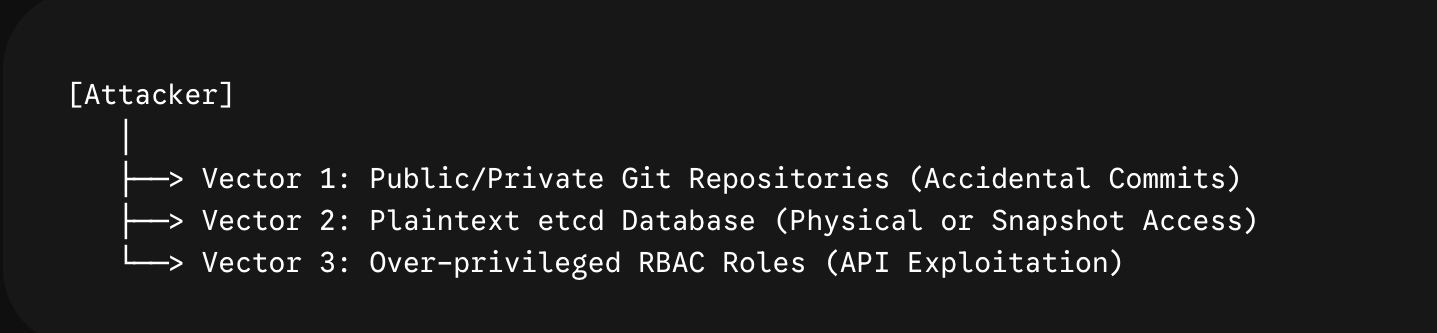
Vector 1: Git Repository Leaks (The GitOps Pitfall) Because Kubernetes relies heavily on declarative configuration files, developers frequently adopt GitOps workflows. If you run kubectl create secret generic my-secret --from-literal=password=12345 --dry-run=client -o yaml and commit that resulting YAML file to a repository, your secret is exposed. Automated scanners crawl GitHub constantly looking for Base64 strings that match secret patterns.
Vector 2: Unencrypted etcd Storage All cluster states, configuration details, and Secrets are stored in a distributed key-value database called etcd, which lives on the control plane nodes.
By default, the Kubernetes API server writes data to etcd in plaintext.
If a hacker compromises a control plane node, gains root access, or manages to steal a backup snapshot of the etcd directory, they can read every single secret across your entire cluster instantly.
Vector 3: Over-Privileged RBAC Policies Kubernetes uses Role-Based Access Control (RBAC) to govern permissions. If a user, a third-party tool, or a compromised Pod’s ServiceAccount is granted get, list, or watch permissions for the Secrets resource in a namespace, they can query the API server and extract the raw values effortlessly.
Often, developers grant broad access like verbs: ["*"] on resources: ["*"] during debugging and forget to clean it up.
Vector 4: Container Images and Environment Variables When a Secret is injected into a Pod as an environment variable, it is visible to anyone who can run kubectl describe pod or access the container's process environment (/proc/1/environ). If an attacker exploits an application vulnerability (like a Remote Code Execution) inside the container, they can easily read all environment variables.
How to Make Kubernetes Secrets Natively Safe
While the default settings are highly insecure, Kubernetes does provide native, built-in features to harden your cluster's security posture.
Step A: Enable Encryption at Rest
You must configure the Kubernetes API server to encrypt Secret data before writing it to etcd. This is achieved by creating an EncryptionConfiguration file and passing it to the API server via the --encryption-provider-config flag.
Here is an example config using the strong aescbc transformer:
apiVersion: apiserver.config.k8s.io/v1
kind: EncryptionConfiguration
resources:
  - resources:
      - secrets
    providers:
      - aescbc:
          keys:
            - name: key1
              secret: <32-byte-base64-encoded-secret-key>
      - identity: {} # Fallback to plaintext for older data
When this is active:
The API server intercepts the
kubectl applyrequest.It encrypts the payload using
key1.It writes the encrypted block to
etcd. Even ifetcdis stolen, the data is unreadable ciphertext.
Step B: Lock Down RBAC (Principle of Least Privilege)
Enforce strict boundaries on who can look at secrets. Never grant cluster-wide Secrets read access. Instead, use localized Roles rather than ClusterRoles, and restrict verbs:
apiVersion: rbac.authorization.k8s.io/v1
kind: Role
metadata:
  namespace: production
  name: app-operator
rules:
- apiGroups: [""]
  resources: ["secrets"]
  verbs: ["get"] # Allow reading a specific secret by name, but not listing all of them
Production-Grade Solutions: Moving Beyond Native Secrets
For enterprise or production workloads, relying strictly on native Secrets—even with encryption at rest turned on—introduces major challenges around secret rotation, auditing, and centralized management.
To solve this, the cloud-native ecosystem relies on third-party integrations:
External Secrets Operator (ESO)
Instead of storing secrets in Kubernetes, you store them in an enterprise-grade external vault like AWS Secrets Manager, Azure Key Vault, or Google Secret Manager.
How it works: ESO runs as a controller inside your cluster. It securely authenticates with your cloud provider, pulls the secret dynamically, and injects it as a native Kubernetes secret in memory.
Why it's great: It allows you to manage lifecycle, rotation, and access control policies in a central cloud console rather than wrestling with YAML keys.
HashiCorp Vault with Sidecar Injection
If you need maximum security and dynamic secrets (e.g., database credentials that change every 15 minutes), HashiCorp Vault is the industry standard.
How it works: Using the Vault Agent Injector, a sidecar container is automatically added to your application Pod. This sidecar fetches secrets directly from Vault via a secure token and mounts them into an in-memory shared volume (tmpfs).
Why it's great: The secret never touches etcd and is never created as a Kubernetes Secret object. It exists solely in the application container's memory space.
Bitnami Sealed Secrets (For GitOps)
If your primary concern is safely storing configurations inside a Git repository without exposing them, Sealed Secrets provides an elegant solution.
How it works: You use a CLI tool (kubeseal) to encrypt your plaintext secret using a public key provided by the cluster. This generates a SealedSecret custom resource, which is safe to commit to public Git.
Why it's great: Only the Sealed Secrets controller running inside your specific Kubernetes cluster holds the private key required to decrypt it back into a standard Secret.
Summary Checklist for Secure Engineering
Action Item | Threat Mitigated | Complexity |
Never commit Secrets to Git | Public source code leaks | Low (Use |
Mount Secrets as Volumes (not Env Vars) | Process sniffing / RCE exploits | Low (Update Pod Spec) |
Enable etcd Encryption at Rest | Physical control plane compromise | Medium (Requires API server access) |
Implement an External Secret Vault | Manual rotation & auditing gaps | High (Requires Vault/Cloud integration) |

